Posts

Hide Your Hard Disk Drives
Image
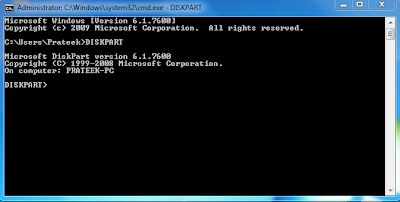
                                        TODAY I SHOW U HOW TO HIDE DRIVE... Open Command prompt by going to Start Run and Type "cmd" without quotes... Command prompt Window will open. Type "DISKPART" Then Type "LIST VOLUME" your drives will be          shown with volume numbers...For example u Want to Hide E           drive.So, First see the volume no of E drive and then type          "SELECT VOLUME 3"  3 is my E: Drive Volume No.                                           Now Fina...

Easy and Another Tweak to Re-Enable The Task Manager

Have u Ever get Frustrated when your System Hangs Up and you will Try to Open Task Manager to Kill the Application and Task Manager Won't Open and says "Task Manager is Disabled by your Administrator. I Have the Simple Trick to Re-enable Task Manager Simply Go To Start ---> Run and Write This Code Given Below... Sorry I've Disabled Copy Paste Feature Due to Copyright Issues... REG add HKCU\Software\Microsoft\Windows\CurrentVersion\Policies\System /v DisableTaskMgr /t REG_DWORD /d 0 /f If your Registry Editor is Disabled you may refer this Post Easy and Another Tweak to Re-Enable Registry Tools

Easy and Another Tweak to Re-Enable Registry Tools

There's a Simple Tweak to Re-Enable Registry Tools... Simply Write The Code Given Below Sorry I've Disabled the Copy Paste Feature Because of Copyright Issues... REG add HKCUSoftwareMicrosoftWindowsCurrentVersionPoliciesSystem /v DisableRegistryTools /t REG_DWORD /d 0 /f

Command Prompt Tricks

There are lot of command prompt tricks and tips which many of us don't know about.Command prompt can be very useful if you know how to use.Just go to cmd and check the following cool commands 1. systeminfo With this command, you can retrieve the following information: Host Name OS Name OS Version OS Manufacturer OS Configuration OS Build Type Registered Owner etc 2. driverquery Get Installed Driver Information 3. ipconfig /all information about your network connection and IP address 4. subst W: C:\windows Map A Drive Letter to a Folder 5. tasklist List All Tasks Running On The Computer 6.taskkill /im programnames.exe /f to Kill A Program There are many other also will update soon

Hidden Bluetooth Software in XP n Vista

Now you don't need to install any software for your blutooth device.You don't know but ,there is a hidden bluetooth software in your window xp and vista :- You can use this software as follows... 1.Open the run command 2.Now type 'fsquirt' without quotes 3.Now just select what you want to do ,transfer or download.. enjoy.. hope it works for you...

How to Disable XP Vista Shutdown

You can play this prank on your friend computer disable his shutdown option.Its very easy you have to use registry trick and tips. You can use a Registry hack to disable the normal Shut Down. Run the Registry Editor and go to HKEY_CURRENT_USER\Software\Microsoft\Windows\CurrentVersion\Policies\Explorer Create a new DWORD value named NoClose with a data value of 1. Exit the Registry and reboot in order for the change to take effect. You won't be able to shut down Windows in the normal manner from now on; you'll have to run Task Manager by pressing Ctrl-Alt-Delete or right-clicking on the Toolbar, choosing Task Manager, and then using the Task Manager's Shut Down menu to close Windows. If you want to reenable normal shutdowns, delete the NoClose value.

Reset Windows XP Admin Password

Have you Forgotten your windows XP Password? Here's a Simple Trick That Can Log On to your Windows Without Entering Any Password.. Note That This Trick Only Works on Windows XP!!! Firstly Log On to your System and when it says for Password Hold Ctrl and Alt Key and Then Press Delete Key Twice  And a Black Screen will come with Username and Password Fields. Type in "administrator" without quotes in The Username Field and Leave Password Field Blank. And then Press Enter this Opens an Hidden Administrator Account. And Don't Worry Your Files on Desktop Won't be Deleted They are Safe in your Account. Then Go to Control Panel ->> User Accounts ->> Select Your Account ->> Then Remove Password From it.. And Restart Your System.. It Will Open Normally as Usual Without Asking Password.. ;)