Posts

How To Add Something To The Right Click Send To Menu
Image
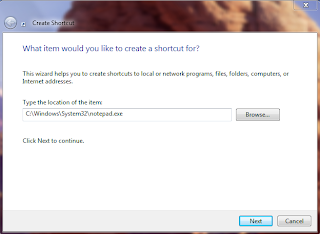
Normally, whenever you right click on any file or folder in Microsoft Windows, in the pop up menu there is a SEND TO option that allows you to send the selected file or folder to some other application, folder or device. For Example, it may be possible to send a file to WinZip, to some Bluetooth Device or someplace else.   Simply Click on The Start Menu and type in the search box shell:sendto and press Enter Let us assume that you want to add Notepad to the Send To Menu. In that case, all you need to do is create a new Shortcut in the folder that you opened early. Here's The Screen Shot Now, whenever you right click on any file or folder, you will see Notepad as one of the Send To destination options. You Can Also Try This on Hard Disk Drives for Direct Copying Of Material From CD/DVD/USB DRIVE etc. As Simple as that!
Create Your Own Customised Run Commands

Image
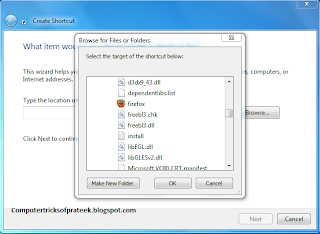
The Run Command on Microsoft Windows operating system allows you to directly open an application or document with just a single command instead of navigating to it’s location and double-clicking the executable icon. However, it only works for some of the inbuilt Windows programs such as Command prompt (cmd), Calculator (calc) etc. So, have you ever wondered how to create your own customized Run commands for accessing your favorite programs, files and folders? Well, read on to find out the answer. Creating the Customized Run command Let me take up an example of how to create a customized run command for opening the Mozilla Firefox. Once you create this command you will be able to open firefox just typing "ff" or whatever (without quotes) in the Run dialog box. Now Steps to do.             Right click on your Desktop and select New -> Shortcut.             You will see a “Crea...

Download Facebook Messenger App for Windows

Image
Facebook has recently launched a standalone chat application Facebook Messenger for windows OS after releasing it for Android, BlackBerry and iPhone devices. Facebook Messenger lets you to chat with friends without opening Facebook in browser ,similar to Gtalk and Yahoo messenger but with some additional features. In the Facebook Messenger you can chat with your friends, see the live updates in ticker and get quick notifications.                                           As of now this app doesn’t allow you to chat in group and make video calls to your friends. Limiting chat availability ( offline mode ) and Edit Settings feature is also not available in current version of this app. How to get it:   Earlier Facebook has released it for ...

Fix MBR in Windows 7

What is MBR? When the computer system is turned  ON the first program that it loads is  BIOS ( Basic Input Output System ).The BIOS also need a memory address from where it can load its Boot Program known as  MBR ( Master Boot Record ) or   Master Boot Sector or  Boot Sector which starts the further processing .The exact location of this boot record is cylinder 0, head 0 and sector 1 which is the first available space on harddisk. MBR contains all the necessary information for loading the operating system. Some Error Messages and their Causes: If your system’s  MBR gets corrupted your operating system will not load and this is commonly referred as Window Crash.MBR can become corrupted due to viruses in your operating system or sudden Power OFF.Following are the error messages you will get due to corrupt MBR Error in loading operating system Missing operating system Invalid partition table Most Popular = (BSOD) T...

Make Your Facebook Account Secure

Image
Hacking Someone's Facebook Account and Posting unacceptable content is become a method of these days of taking revenge... This can happen to anyone so preventive measures are important to take. How to Secure your Facebook Account from Hackers: Login to your Facebook Account and go to Account Settings .   Choose Security Tab from Left Window pane.   Method 1: Enable Secure Browsing In your Security Settings click on Secure Browsing tab. Do check mark on the Browse Facebook on a secure connection (https) when possible Checkbox and then click on save changes button.  Now you will see your Facebook Account will be open as https:// www.facebook.com instead of http:// www.facebook.com . Method 2: Login Notifications By enabling login notifications you will receive alerts whenever your Facebook account is opened from an unknown device.You can associate your computer or mobile with your Facebook account.If your a...

Google Gravity Fall Down Trick

Image
There are lot of people online who play with the Google Homepage everyday in one or the other way., One like that can be found on MRDoob’s page which is given below. The MR Doob team have designed a webpage in which Google Homepage falls down from the top as soon as you move cursor inside the page. You can also click on the fell down Google homepage to move them to top, to make them oscillate and play with it. This works best on Google Chrome, But you can also try this on Firefox with limited options. It is really cool to see the Internet Giant Google to fall down To get this Gravity webpage, Follow the following instructions : Open Google.com Go to Search settings option. Turn off Instant search. Now visit Google.com again and enter Google Gravity in the search box. Now press I am Lucky button And Then Type anything in the search Box then, press Enter key. Your Results will fall down...

Install Windows 7 or Vista Using Bootable USB Disk Drive

Image
Installing an operating system to computers that don’t have an optical drive has been a problem. For example, if we want to install Windows 7 in netbooks like ASUS Eee PC, Dell Mini Netbooks, Acer Aspire One, HP Mini 1000 etc. , then we need to use a bootable pen drive to install it. With the release of the full version of Windows 7 and its gaining popularity, many people have decided to go for Windows 7 over Vista. Well the method given here is one of the easiest techniques known which does not need any kind of download and the clear screen shots have been given. The advantage of using this method is that, the whole process of installation finishes in lesser time than installing via an DVD.This method will also work for Windows Vista Installation. But this Will Won't work on XP I will soon find way to Install Windows XP Using USB.. Requirements : 1. A USB Drive of minimum 4GB space 2. Windows 7 installation DVD or ISO file (Back Up will also do) B...