Posts

How To delete and uninstall all the programs and softwares with one click !
Image
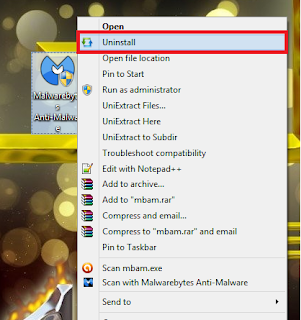
When you need to make your computer Faster you’ll need to uninstall the programs and delete them from the computer and delete this big files and data from hard drive but when it comes to uninstalling the programs you might be lazy to delete them one by one and that might be a little hard and can take a while so today we had to search for a solution today we have a trick that will help to delete all the programs with one single click .yes that’s right only one click Menu Uninstaller Ultra Menu Uninstaller Ultra is basically a program made to make your life easier and help you to delete all the unused programs and software with one click , all you have to do after that you have downloaded and installed the program is to click on the program that you want to delete it with right click and then click on uninstall From the drop-down menu, where you see a message do not hesitate to click on Continue and select as a final step hit skip this & uninstall thus you are now...
What is BIOS ? And When it should be updated and when should not !

BIOS is an abbreviation of the phrase (basic input output system) when you boot your computer The BIOS starts to engage what’s called “Post” where it starts examines each computer components and if it happens that BIOS found some it alerts you depending on the severity of this error like shutting the computer down or releasing the sounds of rings Also Each Brand have it’s own signal meaning and to check it you can by the company’s official website . For more Information about Bios and how it works : BIOS Usually updating a program or operating is important and useful . But when it comes to BIOS it may not make your computer faster but Actually sometimes it can get you some new errors and bugs . so we conclude that we should update BIOS only when needed . When The BIOS should be updated and when should not ! When we should not update the BIOS The BIOS is not some sort of a huge program that comes with his updates some new features or fix some Bugs . The Case ...

How to Get Hidden Themes in Windows 7

Hello Friends, you will be glad to know that there are Hidden Themes in Windows 7. I Found the Themes in Morning Today. There are Themes of 5 Countries.  United States (Already Present) United Kingdom South Africa Canada Australia To Get the Themes, Follow These Steps. Open Folder Options From Computer - Organize-"Folder Options" UnCheck  "Hide Protected Operating System Files"  Now Go to C:\Windows\Globalization\MCT\ In This Folder you will see folders with name MCT-XX where XX will be AU,CA etc.These are the country codes in which these themes are automatically available. Click on Particular Country's Folder and Click on Themes and Click on .Theme file. Your Theme will added Automatically. Enjoy.!!!

How To Access Wikipedia in Offline Mode Wikipedia Access Without Internet Connection - Pocket Wikipedia

T oday i am sharing an Great Software With you . which permits you to  access wikipedia in without internet connection . this software knows as pocket wikipedia. Pocket wikipedia is small application tool which helps you to access wikipedia in offline mode or without internet connection . this application works on Windows,Linux Operation System And Widows Based Mobiles. T o Download Click Here For Download Wikipedia Application

Optimizing Internet Connection Using Internet Cyclone - Increase Internet Speed in Windows

Image
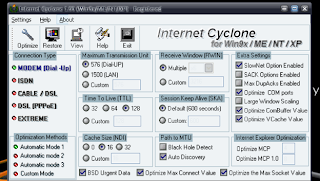
Internet Cyclone  Is a powerful Internet tool for Windows 7,  9x, NT, 2000, 2003 and XP created to modify your Windows registry settings in order to speed up internet connection Speed up to 200% Internet Cyclone Main Features:     Speed up internet to 200% in just a few seconds.     It's compatible with all modems and high-speed LAN, ISDN, CABLE, DSL, T1 or other internet connections .     It will speed up video streaming like Youtube, Metacafe, Google, etc.     It will speed up web surfing, online gaming, e-mailing, etc                                                     Click Here For Download Internet Cyclone 

Free calling within the US and Canada through 2013

Many of you call phones from Gmail to easily connect with friends and family. If you're in the US and Canada, you'll continue to be able to make free domestic calls through 2013. Plus, in most countries , you can still call the rest of the world from Gmail at insanely low rates.

Top Ten Tips To Improve System Speed

1.Let your PC boot up completely before opening any applications. 2.Refresh the desktop after closing any application. This will remove any unused files from the RAM. 3.Do not set very large file size i mages as your wallpaper. Do not keep a wallpaper at all if your PC is low on RAM (less than 64 MB). 4.Do not clutter your Desktop with a lot of shortcuts. Each shortcut on the desktop uses up to 500 bytes of RAM 5.Empty the recycle bin regularly. The files are not really deleted from your hard drive until you empty the recycle bin. 6.Delete the temporary internet files regularly. 7.Defrag your hard drive once every two months. This will free up a lot of space on your hard drive and rearrange the files so that your applications run faster. 8.Always make two partitions in your hard drive. Install all large Softwares (like PSP, Photoshop, 3DS Max etc) in the second partition. Windows uses all the available empty space in C drive as virtual memory when your Computer RAM is...